[1] 16640.800 2872.169Lab 4: Reinsurance. Data frames
1 Reinsurance
For the next task, you will need to use function pmax. If a is a vector \((a_1,\ldots,a_m)\) and x is a number, then usual max(a,x) returns \[
\max\{a_1,\ldots,a_m,x\}
\] that is a number, whereas pmax(a,x) returns \[
\bigl(\max\{a_1,x\},\ldots,\max\{a_m,x\})
\] that is a vector.
1.1
Set seed \(234\). Simulate \(15000\) values for a reinsurer where (aggregated) claims have a compound Poisson distribution with parameter \(900\) and the individual claims have log-normal distribution \(logN(7,0.3^2)\) under individual excess of loss with retention \(1700\). Find the mean and the standard deviation of the obtained data, i.e. using the notations from the lecture notes, estimate \(\E(S_R)\) for
\[ S_R=Z_1+\ldots+Z_N \]
from the sample, and also estimate \(\sigma(S_R)\) from the sample.
Check the answer.
1.2
We can see, using formulas from the lecture notes, that in the assumption of the previous task \[ \E(S) = \E(N)\E(X)=900\cdot e^{7+0.5\cdot 0.3^2}=1032398 \] (you can also check that the mean of the sample: for \(S\) (not \(S_R\)), with the seed \(234\) it would be \(1032358\), pretty close). Suppose now that the reinsurer applies the aggregated excess \(M\), i.e. the insurer pays \[ S_I=\begin{cases} S, & \text{if } S \leq M,\\ M, & \text{if } S > M \end{cases} \] and the reinsurer pays \[ S_R=S-S_I=\begin{cases} 0, & \text{if } S \leq M,\\ S-M, & \text{if } S > M. \end{cases} \]
Let \(M=\E(S)=1032398\). Modify the previous code and find \(\E(S_R)\), the average paid by the reinsurer under this agreement.
Check the answer.
[1] 14297.372 How to create data frames
Data frame is a table with data.
Each column of a data frame should contain the data of the same type (e.g. only numeric or only characters), however, different columns may have different types:
df <- data.frame(x = 101:103, y = c('a', 'b', 'c'))
df
x y
1 101 a
2 102 b
3 103 cHere we create a data frame
dfwith two columns: columnxcontains \(3\) numbers: \(101\), \(102\), \(103\) (see topic Patterns of Lab 1) and columnycontains three strings “a”, “b”, and “c”.On the left, you can also see numbers \(1,2,3\), these are the indexes which number the rows of the frame.
We will mainly need access to the columns of a data frame. The command has the following simple structure
DataFrameName$ColumnName, e.g.
df$x[1] 101 102 103Stress that the output is a vector. Similarly,
df$y[1] "a" "b" "c"- The data frame may be very large, and we may need to see its structure without showing the whole data frame. For this we can use function
head(...):
x <- 101:10**3
y <- 2*x + 7
df <- data.frame(x, y)
head(df)
x y
1 101 209
2 102 211
3 103 213
4 104 215
5 105 217
6 106 219- By default,
headshows \(6\) rows. One can request more:
head(df,10) x y
1 101 209
2 102 211
3 103 213
4 104 215
5 105 217
6 106 219
7 107 221
8 108 223
9 109 225
10 110 227- Try commands
ncol(df),nrow(df),dim(df)to see their outputs.
2.1
Find the sum of all values in the column y of this data frame df.
Check the answer:
[1] 9972003 How to import data frames
- Often we need to work with external data stored in some files. A popular format for storing text data (that includes numbers) is CSV-format (stands for “fomma separated values”).
3.1
Do the following steps:
Download file numbers.csv and save it in a directory (folder) on your computer (usually it’s “Documents” or “Downloads”).
Save your R-file your are working with in R-Studio to the same directory (folder).
Click with right mouse button on the file name at the top of R-Studio window and choose “Set working directory”.
OR (instead of 3)
- Go to menu “Session”, choose “Set working directory”, and then choose “To source file location”
If you did 1-3 correctly, in “Files” tab on the (down) right part of R-Studio you will see your R-file and the downloaded CSV-file in the same directory.
- Load the saved file by the command
df <- read.csv("numbers.csv")Check yourself:
head(df) x y
1 1.98193075 8.554741
2 0.08423538 4.008477
3 0.33576991 4.920004
4 0.44245007 4.861317
5 0.09377962 4.023355
6 0.42974243 5.1092153.2
It is given that the data in column x of “numbers.csv” file are independent values of a random variable \(X\sim Exp(\lambda)\). Find the estimate \(\hat{\lambda}\) for the parameter \(\lambda\) using the method of moments (see Lecture Notes).
Check your answer:
[1] 1.1527574 How to filter data frames
- Suppose we want to select only those rows of the last data frame where the value of
yis bigger than 5. This condition then has the form:df$y > 5. Sincedf$yis a vector, the result ofdf$y > 5will be also a vector ofTRUEandFALSE:
my_condition <- df$y > 5
my_condition[1:6]
[1] TRUE FALSE FALSE FALSE FALSE TRUEi.e. the first, second, forth, and sixth values of y are bigger than \(5\) (and of course many others, we are just looking here for the first \(6\)). The length of my_condition is the same as the number of rows in df:
length(my_condition) == nrow(df)[1] TRUE- The command
df[my_condition,](notice the comma!!!) will return the data frame which contain only those rows fromdfwhere \(y>5\):
df_cond <- df[my_condition,]
head(df_cond)
x y
1 1.9819307 8.554741
6 0.4297424 5.109215
7 1.1831351 6.374403
8 0.2664600 5.516452
11 0.3309978 5.333065
13 0.7291787 5.758398- Since
df_condis a data frame (and the same column names are inheritted fromdf), we can access its columns bydf_cond$xanddf_cond$y.
4.1
Find the average of all values of y from df such that the corresponding values of x are larger than \(1\).
Check your answer:
[1] 7.6873615 Linear models
Sometimes we may believe that two sets of data are related to each other. The simplest relation is linear, like \(y=kx+b\).
If one has sets of data \(x=(x_1,\ldots,x_n)\) and \(y=(y_1,\ldots,y_n)\), one can find \(k\) and \(b\) which would be the best possible to make $y_ik x_i +b $ for all \(i\).
Usually, it is done using the linear regression method which chooses \(k\) and \(b\) so that
\[ \sum_{i=1}^n(y_i - (kx_i+b))^2 \]
would be smallest possible (for the given \(x\) and \(y\)).
- In the data frame above, we may suspect that \(y\) and \(x\) are linearly related:
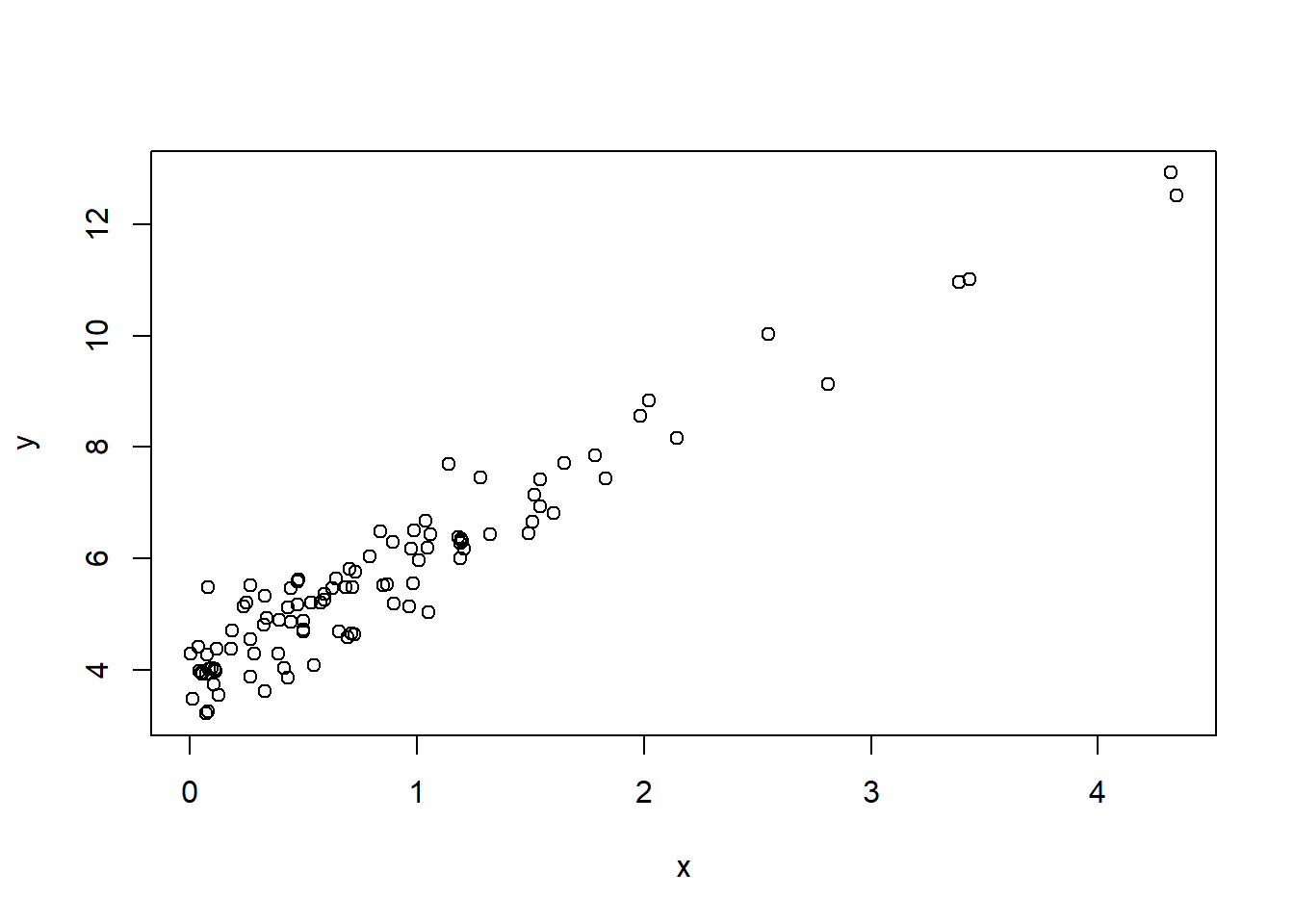
- The corresponding R-code to find optimal \(k\) and \(b\) is the following:
lm(y ~ x, data = df)
Call:
lm(formula = y ~ x, data = df)

Coefficients:
(Intercept)            x
      3.933        2.071
Here
datais the name of the parameter of functionlm(stands for “linear model”), anddfis the data frame which contains columnsxandy. In other words, if columns ofdfwould had namescolXandcolY, we would writelm(colY ~ colX, data = df).The
(Intercept)corresponds to \(b\), and value ofxhere is \(k\). One can access the obtained values:
ans <- coef(lm(y ~ x, data = df))
ans
(Intercept) x
3.932877 2.070541 and then ans[1] is \(b\) and ans[2] is \(k\).
5.1
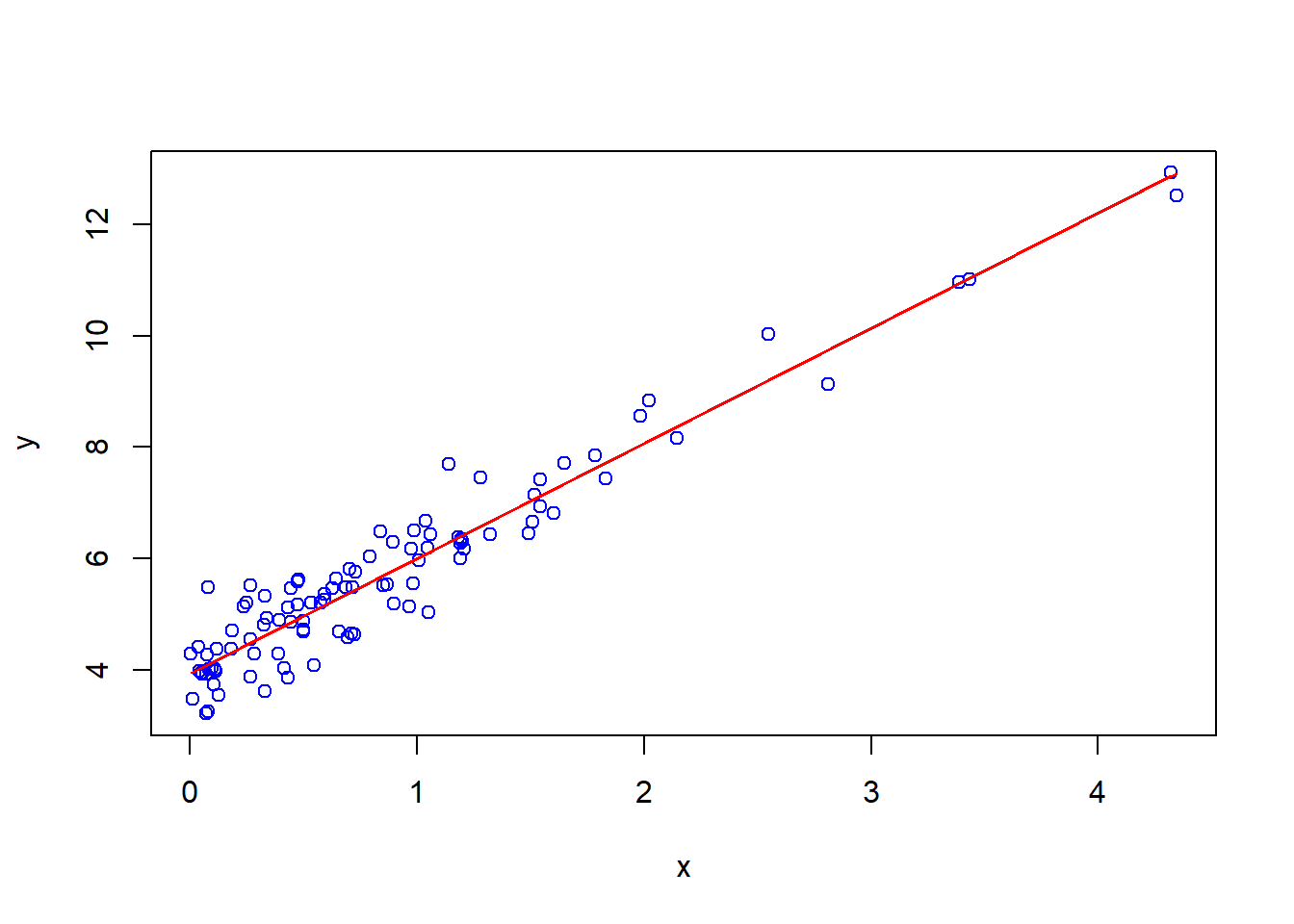
Plot on the same diagram the scatter plot \(y\) against \(x\) as it is shown above, but in blue color, and plot the line \(y=kx+b\) with the found values of \(k\) and \(b\) (do not copy-paste, use coef function) in red colour. (See Lab 3 for plotting two graphs on one diagram).